Your dev work under control.

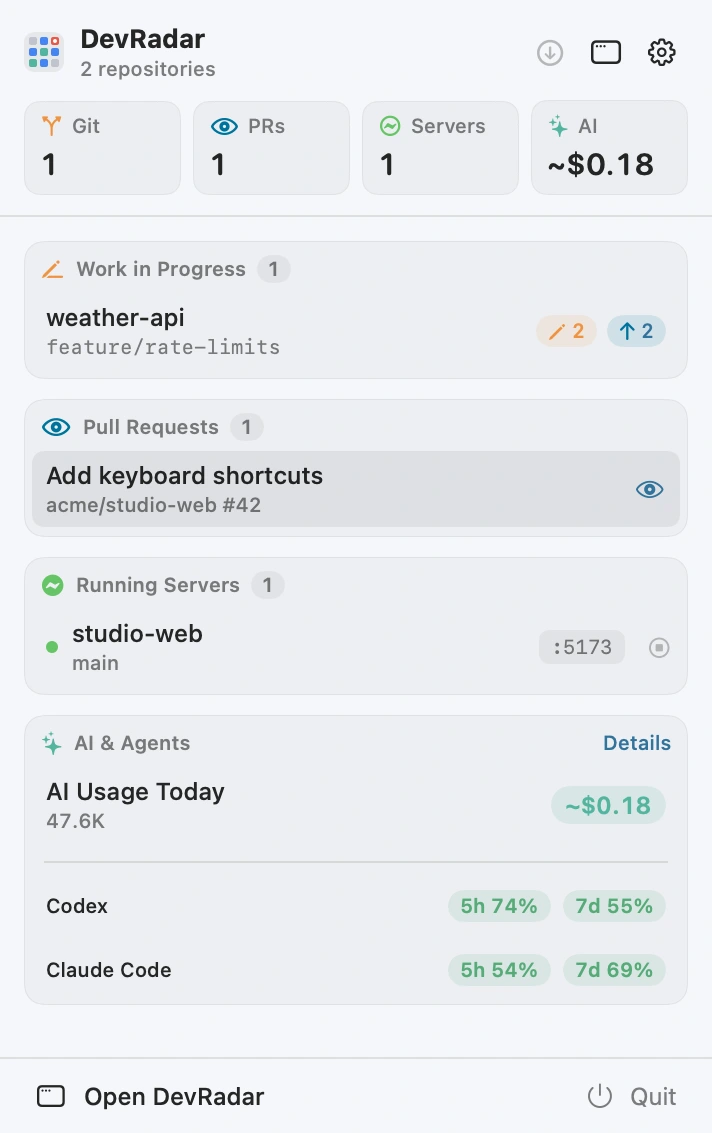
See unpushed work, reviews waiting on you, remaining AI quotas, and space you can reclaim.

Download Mac beta

Apple silicon · macOS 15 or later

macOS may block the beta on first launch while Apple notarization is pending.

DevRadar in action

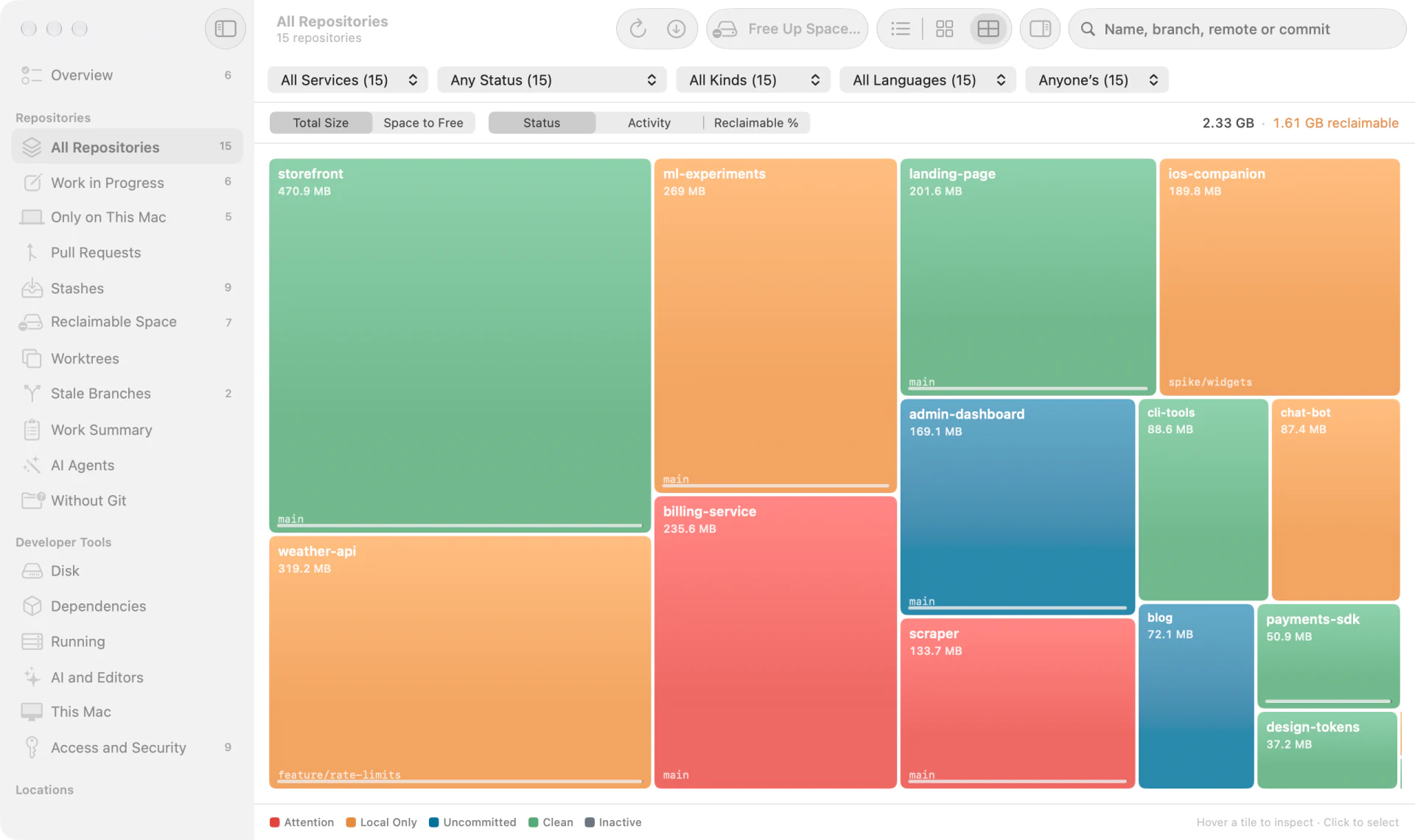
DevRadar repository map, with tile size showing disk usage and color showing Git status.

Repository health

Switch between a sortable list, a grid of status cards, and a map sized by disk usage.

  • Spot uncommitted changes, unpushed commits, forgotten stashes, and projects without Git
  • Open a repository from the grid or map to see its branches, remote, and local changes
  • Sync worktree .env files and clean up merged worktrees

Work Summary

See a year of Git activity across your repositories in an interactive heatmap.

  • Select a day or project to see what changed
  • Compare commits, lines added and removed, active projects, and streaks
  • Copy a summary for a standup or weekly update

AI usage and quotas

See how much quota is left for Codex and Claude Code and when the limits reset.

  • Read five-hour and weekly limits once quota reporting is set up
  • Explore local token usage and estimated API costs by day, project, model, and session
  • Review agent instructions and skills, and manage MCP servers

Disk cleanup

See how much you can reclaim from builds, dependencies, caches, simulators, and AI tools.

  • Find large repositories and files, and review what each cleanup would move to the Trash
  • Offload a verified repository and clone it back when you need it
  • Archive any project locally and see your cleanup history

Reviews, servers and Mac tooling

Choose your project folders. DevRadar tracks their Git status and shows what needs your attention.

Pull and merge requests

See what is waiting on you across GitHub and GitLab.

  • Find reviews assigned to you, requests you opened, and CI checks that need attention
  • Open a review or a deployment preview from DevRadar
  • Fetch automatically and pull fast-forward changes from the app
GitHub and GitLab requests grouped by who needs to act, with review, CI and preview statuses.

Quick Open

Press ⌘K to jump to a repository, server, action, or section in DevRadar.

The Quick Open panel suggests repositories, app sections and actions.
Spotlight & ShortcutsOpen repositories in your editor or run them from anywhere on your Mac.
Desktop WidgetYour unsent work and top findings at a glance.
MCP for AI agentsAn optional read-only devradar-mcp helper lets coding agents inspect your setup.
Setup for a new MacExport a Brewfile, repository clone list, runtimes and Git identity without secrets.

Developer tools and security

Check credentials, dependencies, runtimes, and what is running on your Mac.

  • Find secrets tracked by Git and missing .env variables with secret values hidden by default
  • Check dependency vulnerabilities, outdated packages, installed runtimes, and expiring signing certificates
  • Find running servers, pinned ports, simulators, and processes using CPU or memory
Secrets in Git lists affected repositories and the names of variables whose values stay hidden.

Integrations

Git and CI

  • GitHub

    Pull requests, reviews assigned to you, and CI checks.

  • GitLab

    Merge requests, pipelines, and deployment previews.

AI agents

  • Codex

    Remaining quota and token usage from local session logs.

  • Claude Code

    Token usage and remaining quota with the status line set up.

Environment and containers

  • Homebrew

    Installed packages, available updates, and old versions taking up space.

  • Docker

    Local Compose projects and containers with the Terminal helper.

Languages and runtimes

Compare the versions installed on your Mac with those required by your projects.

  • Node.js JavaScript and TypeScript
  • Python
  • PHP
  • Go
  • Ruby
  • Rust

Your code stays on your Mac.

DevRadar is sandboxed, reads only folders you choose and never surprises you.

Environment variables with secret values masked.
No trackingThe Mac app has no analytics or ads and sends no data to the developer’s servers.
Secrets stay secretTokens show masked; values appear only when you ask.
Nothing deleted for goodCleanup moves to the Trash, deleted branches are logged with their commit.
You see every commandCommands are copied or shown in full before they run; sudo never runs.

Try DevRadar on your Mac

Apple silicon · macOS 15 or later. Need help? Visit support.

Download Mac beta